How to download AION 2 on Steam
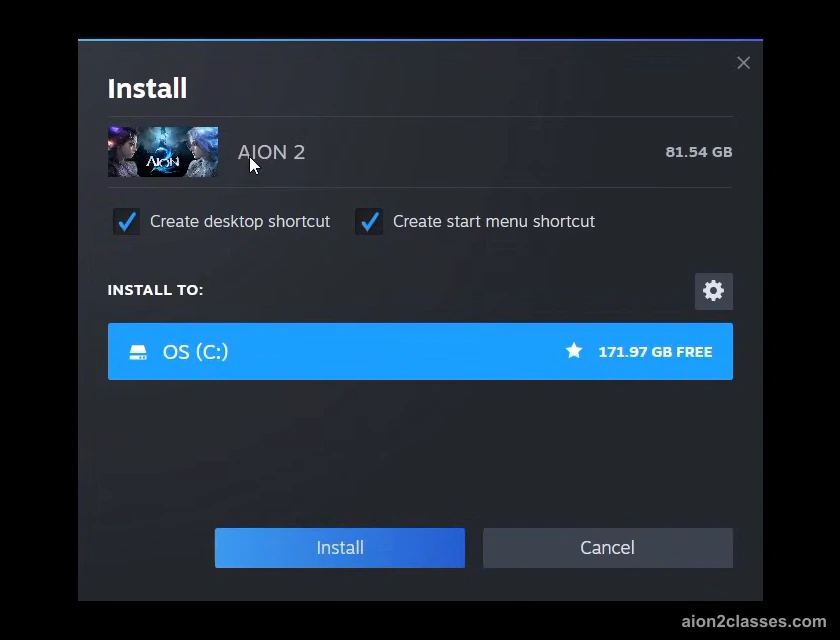
- Open the AION 2 page on Steam and add the game to your library; it is free.
- Install it on a drive with 100 GB free, ideally an SSD.
- Start the game from Steam. A Steam account is enough; you do not have to link a PURPLE account.
Get AION 2 on Steam (NC's official Steam store page)
How to download AION 2 on PURPLE
- Download PURPLE, NC's own launcher, from NC's site and sign in with your NC account.
- Find AION 2 in PURPLE and install it on a drive with 100 GB free, ideally an SSD.
- Start the game from PURPLE. It is the same game as on Steam, on the same servers.
Get NC's PURPLE launcher (NC's official PURPLE download page)
Steam or PURPLE: which to pick
- The in-game content is the same on Steam and PURPLE, and Steam and PURPLE players share the same servers.
- You can play on Steam without a PURPLE account. Link the two only if you want the same characters and progress on both.
Pick Steam if you already use it; it only takes a Steam account. Pick PURPLE if you want NC's own launcher. You can link the two later and keep the same characters on both.
How big is the AION 2 download?
NC asks for 100 GB of free space and recommends an SSD. The minimum PC is a AMD Ryzen 5 2600 or Intel Core i5-10500 with 8 GB of memory and a NVIDIA GTX 1050 Ti (4GB); NC recommends a AMD Ryzen 7 3700X or Intel Core i7-11700, 16 GB and a NVIDIA RTX 2070 (8GB). Check yours in a few seconds with our AION 2 PC spec check.
Before launch, NC let players pre-download an encrypted copy of the game; when early access opened, the game decrypted those files, which NC notes is not a reinstall.
How to play AION 2 in the US and Europe
There is one global version for North America, Latin America, Europe and Asia; you pick your region when you choose a server. The regions are Europe, NA East, NA West, Latin America and Asia: US players pick an NA East or NA West server, European players a Europe server. You do not need a VPN; NC's Korean and Taiwanese versions are separate services, and progress there does not carry over. The AION 2 server list shows every server in each region and its partner on the other faction.
Can you play AION 2 on PS5, Xbox or mobile?
The global version is for Windows PC only. NC said before launch that it was being made for PC, and it officially supports only Steam and PURPLE on Windows. It may run on other devices, such as a Steam Deck, but NC does not support them. More platform answers are in the AION 2 FAQ.
After the download
AION 2 is free to play; NC sells an optional Membership (what the AION 2 Membership unlocks). Before you make a character, see the AION 2 character creation guide and compare the classes in the AION 2 classes overview. If the game will not let you in, start with unable to connect to the login server.
AION 2 download FAQ
- Is AION 2 free to download?
- Yes. The global version is free to play on Steam and on NC’s PURPLE launcher; you do not have to buy anything to download and play it.
- How big is the AION 2 download?
- NC asks for 100 GB of free space, ideally on an SSD, and a 64-bit Windows 10 or 11 PC with at least 8 GB of memory.
- Should I download AION 2 on Steam or PURPLE?
- Either. The in-game content is the same on Steam and PURPLE, and Steam and PURPLE players share the same servers. You can play on Steam without a PURPLE account. Link the two only if you want the same characters and progress on both.
- Can I download AION 2 on PS5, Xbox or mobile?
- The global version is for Windows PC only. NC said before launch that it was being made for PC, and it officially supports only Steam and PURPLE on Windows.
- Can I play AION 2 in the US?
- Yes. There is one global version for North America, Latin America, Europe and Asia; you pick your region when you choose a server. US players pick an NA East or NA West server.
Sources
- AION 2 on Steam: system requirements, languages and store details
- NC: Launch FAQ (2026-09-30)
- NC: Pre-download Available Now (2026-09-28)
- NC: Steam Pre-release FAQ (2026-09-16)
- NC: New Server and Matchmaking Information (kept up to date by NC) (2026-10-04)
Checked against NC's official posts on October 24, 2026. Everything on this page comes from NC itself; when NC changes something, we update the page and its date.